Tidy up Your Blu-ray Movies in Delicious Library 2
I managed to get in on the Delicious Library 2 beta a few months prior to launch. After filing a bug report I was handed an invite, and was quite pleased to accept. During my time with the beta, I struggled with having my media displayed using the appropriate jewel cases. Some of the preview screenshots I had seen showed Wii games in a white case, Blu-ray movies in their smaller blue case, etc. But I simply couldn’t get them to work. I found an out-dated support article which reassured me that there are indeed different types of media supported, but I wasn’t able to get any of them to work. This morning by fluke, I typed “blu-ray” as the format for a movie I just added and it assumed the proper case. It seems formats need to be entered in lowercase for the custom cases to work. But even then, you have some guess work to do since DS games need to be prefixed with “nintendo”, while Wii titles don’t. After a little fuckery, I was able to get my Blu-ray movies, DS games, PS3 games, etc. all sporting their proper cases. I was happy, until I noticed something strange on one of my Blu-ray movies.
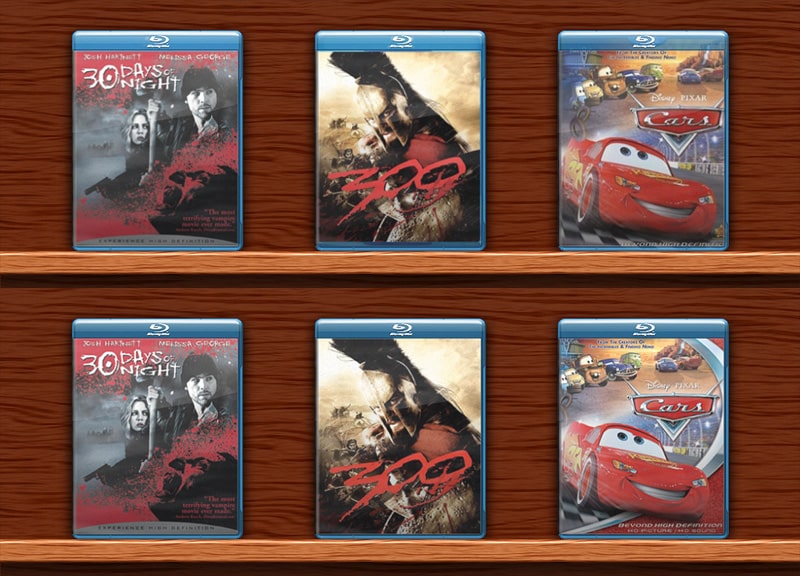
After bumping up the box art size, I noticed that the Blu-ray case is merely overlaid on top of the image itself. Most Blu-ray covers come with the case already on them, so I suppose this is the best approach. But in some cases, the Blu-ray logo was off by a few pixels, and some others seemed to seep through the transparent bezel more than others. Problem being, I’m wicked anal about little details like this and simply couldn’t leave it alone. I cracked open the app, pulled out the Blu-ray case image and created myself a nice little template. By simply masking the case portion an exporting a transparent PNG, I was able to significantly clean up my Blu-ray movies. Yes, now I’m a happy camper!
Here, Have My Template…
It’s a simple PSD which contains a masked folder. Simply paste your cover images into the folder, resize them accordingly, and “save for web” as a transparent PNG. Drag them directly onto the movie you want to replace in Delicious Library and you’re done.
Download (607 KB)
NOTE: This template also works for HD DVD movies, since the case dimensions are exactly the same.