Downloading TV Shows – Network Sharing Goodness

A few months ago I wrote about downloading TV shows, and the steps I take that allow me to watch them in the living room on the main TV. I was taken back by the feedback I received and surprised how many people were doing something similar, as opposed to taking one of the many simpler routes. Many great tips and techniques were shared, and I’ve done a lot of research and consideration since. While I haven’t come up with the end-all-be-all solution, I’ve eased the process and expanded the reach.

Working With What I Have

I looked at many of the set-top solutions that are out there at the moment. There are many relatively inexpensive devices that will play just about anything you can throw at them, but adding another device to my entertainment setup isn’t something I’m thrilled about. Recently, my wife has been watching a few of her own shows and I thought it would be great if she didn’t rely so much on me and had a bit more flexibility in terms of when and where she could watch them. This is when I started looking into network storage solutions.

My router, an Apple AirPort Extreme supports hard drive sharing via USB. I had an old 200GB drive in a NexStar 3 enclosure kicking around from my PC days, which made for a perfect test candidate. Sure enough, it was as simple as plugging the drive into the router and enabling disk sharing via AirPort Utility. Now, not only can I access the drive from my iMac in the basement office, but Deanna’s MacBook can as well, along with the Xbox 360 and PlayStation 3 in the living room.
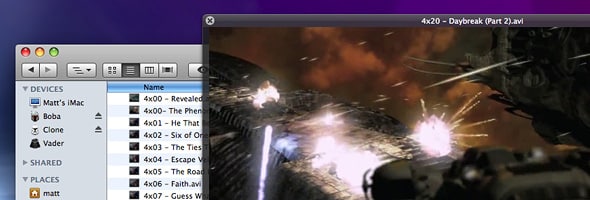
Network Sharing

Having a network drive eliminates the need to manually move files around via USB thumbdrives, but there’s still the issue of compatible file formats and the hardware used to play them. Obviously, there’s no issue when it comes to our Macs, but the game consoles are limited in the codecs they support. As I mentioned previously, I download videos at 720p which are typically encoded in MKV format, which as you may have assumed, is not supported by the consoles. This is where I haven’t been able to shave any steps off. I still have to re-encode the files to AVI so the consoles can play them, which isn’t a huge deal, really.

Expanding the Reach

From time-to-time, my wife, daughter and I find ourselves all into games at the same time. And usually all of them being Xbox 360 titles. Picking up a second console is something I have thought about many times over the past year, but justifying the hefty purchase wasn’t the easiest task. But now we found ourselves with another reason for an additional Xbox 360 – watching TV shows. Having a second Xbox 360 in the bedroom means we can stream video over the network not only to our Macs and the TV in the living room, but to our bedroom as well. Suddenly, the whole house has access to all of our downloaded shows at any given time, and we’re no longer restricted by the limited storage capacity (8GB) of the USB thumbdrive.

When I put all of this together in my head, I had a feeling it was one of those “too good to be true” moments. But to my surprise, streaming 720p video to the bedroom worked like a charm right off the bat. The only catch, is that things get ugly when more than one device is tapping into the network storage drive.

New Hardware

Once the tests proved successful, I invested in a new NexStar 3 enclosure with SATA support (my previous one was IDE) and a Western Digital Caviar Green 1TB hard drive. The next step will be to move to a RAID setup for peice of mind, but I wanted to ensure this was going to be a long term solution for us before going all out.

27 people have had something to contribute so far.

 
April 28th, 2009 at 11:38am

Thanks for the writeup, Matt! I’ve been looking to see what will work best for me as well, and this is some great insight. Just to confirm: your 360s actually see (and more importantly can play from) a drive simply shared via AirPort Extreme?

     
    Matt Brett
    April 28th, 2009 at 9:53pm

    Ah, I had a feeling I forgot something when I hit the publish button. You need Connect360 or Rivet if you’re running a Mac. Unfortunately, both the Xbox 360 and PS3 require some sort of media server software running on a computer connected to the network. The good news is that the software isn’t limited to a single console.

       
      April 29th, 2009 at 6:46am

      Gotcha, very good. I’m already using Connect360 and love the thing. Thanks for the follow up, Matt!

 
April 28th, 2009 at 11:40am

Nice to see what you did in the end. I was in virtually the same position and must have read every comment from the original article before deciding on an Airport Extreme & 360 too – works great!

     
    Matt Brett
    April 28th, 2009 at 9:56pm

    Good stuff! Indeed, it works surprisingly well. So much so, that like I said, I’m already starting to think bigger.

 
April 28th, 2009 at 11:52am

That’s a great idea, I was unaware of the ability to share a hard drive through the Apple Airport Extreme.

So with your 2nd Xbox 360, do you use the 360 wi-fi accessory or are you directly connecting an ethernet cable? My problem is that my router is in the living room and don’t want wires running all over the house. Was kind of skeptical of the 360 wi-fi accessory especially with it’s steep price.

     
    Matt Brett
    April 28th, 2009 at 9:59pm

    I hate wires, so this was a big decision for me as well. I have my router sitting on top of my entertainment unit, so my main Xbox 360 and PS3 are both wired. I was reluctant to buy the official wi-fi adapter due to the price, but wasn’t keen on the DIY work-arounds, so I bit the bullet. Luckily, I found it (at a Loblaws Superstore) for $69.99, which wasn’t too bad at all. I thought it was going to choke on streaming 720p video, but not the case at all. It’s been flawless! The console in the bedroom is directly above the router, so not a huge distance to travel, which might have something to do with the performance.

 
April 28th, 2009 at 12:26pm

This seems like a pretty sleek solution, but damn; if you take the Mac aspect out of the equation, we’ve been using a PS3 in the living room as our media hub simply by our setting our PCs to automatically run a lightweight media server app.
I’d be surprised if there wasn’t a similar solution for Mac, unless you’re trying to cut out the need for a PC to be involved altogether.
As a bonus, we can play 1080 .mkv files over 10/100 no problem – since the videos are decoded and buffered on the PC.

     
    Matt Brett
    April 28th, 2009 at 10:01pm

    What’s the software you’re running? I know Sony released official media server software for Mac a little while ago, but I doubt it decodes/transcodes MKV.

    As I stated in a comment above, I still need a computer to run the media server software for the 360s anyway.

       
      April 29th, 2009 at 1:08am

      Ha, I didn’t even check, but there is actually a version for OSX (though I think it only works on the Intel based Macs). It’s called PS3 Media Server – http://code.google.com/p/ps3mediaserver/ – worked perfectly for us for about 4 months now, we can’t seem to stump it, and it even works over wifi (though .mkv’s struggle a bit).

      It can also serve music, images and streaming media, as well as making archives browsable and playing DVD ISOs… You can even add RSS video, audio or image feeds, though I haven’t tried it. Check out the full features list on the Google code page; apparently it already has basic Xbox 360 support (for your bedroom) – I’d say that means it can play videos, but probably not any of the extended features.

 
April 28th, 2009 at 12:26pm

Been trying to figure out a similar way of sharing media around the house and have yet to find something that works well (just sharing mkv 720p videos with the other laptops in the house, netbooks, doesn’t work for shit). I didn’t think of streaming to the 360s though, that could work perfectly. :)

But I wonder, if you needed to add a third box to stream those HD videos to, and that box would never be used for gaming no matter it’s functions, what device to get?

     
    Matt Brett
    April 28th, 2009 at 10:06pm

    Western Digital’s WD TV looks pretty sweet, and is very affordable. I like that you hook up an external drive, since expanding is effortless. But the down side is that it doesn’t connect to your network. So you physically have to move the storage drive to add new content.

       
      April 29th, 2009 at 11:17pm

      Looks sweet, but thinking it over I think I need that network access. (It would be for a computer illiterate and I’d need to be able to manage the content remotely; with a networked device, I can do that through an available FreeNAS server.) I can’t think of any use for the WD TV as such, but I’m still oddly tempted to get one… It seems like it’d be a fun toy. :p

      [They're on sale this week at NCIX.com for $109.00 CDN, if anyone reading this is considering one.]

      Did some searching last night for possible options, cheapest I could find that would do the job was the 360. Goofy. Gotta contemplate that one I guess.

         
        ToastedSoul
        May 2nd, 2009 at 6:39am

        There’s a mod to add a network connection to the WD TV. I read this in the German c’t magazine a few weeks ago. I haven’t looked for more information, but I’m sure you guys can find it.

           
          ToastedSoul
          May 4th, 2009 at 7:52am

          I checked the magazine again, but the links listed there seem to be dead. The new page about the WDTV mods is here:

          http://wiki.wdtv.org/doku.php

 
Casey Subscribed to comments via email
April 28th, 2009 at 12:41pm

Nice writeup. I am doing almost exactly the same thing with my Airport Extreme sans my gaming consoles.
What are you using to re-encode your videos for play on your Xbox??

     
    Matt Brett
    April 28th, 2009 at 10:07pm

    I’ve been using VisualHub for ages. It was discontinued a little while ago, but still works like a charm.

 
R Subscribed to comments via email
April 28th, 2009 at 3:25pm

Interesting setup. I have a Windows Home Server box connected to my router for 4TB of storage, but I refuse to convert the MKV files to play on my 360 so I hope Sony or MS eventually allows their boxes to play a greater range of file formats…

     
    Matt Brett
    April 28th, 2009 at 10:09pm

    Bah, that won’t happen. I know there are ways to automate the process, but since I use my Mac for work as well and video encoding software is CPU intensive, that simply won’t work. Still looking for a solution in this department.

 
April 28th, 2009 at 8:59pm

Glad to see you have tackled these beast. A short time ago I too tried to see where I could get this too work. I wasn’t really pleased with the 360 when it came to playing video formats and I didn’t want to have to re-encode anything. I was looking at media devices and found a gem. The Western Digital WDTV is incredible. Plays a huge number of video formats as well as music and photos. I have been able to copy the kids DVDs to a drive and then play it through any TV. I absolutely love it.

     
    Matt Brett
    April 28th, 2009 at 10:10pm

    That was one of the devices I was looking into, but what I discovered was that you can’t connect it to your network. Is that right? You have to move your hard drive around to manage the files stored on it? That’s a show stopper for me.

 
April 29th, 2009 at 12:09am

One way to think big is to get an upcoming netbook that features the NVIDIA ION platform, which can easily decode 1080p files with no problem. Then use a program like Boxee or XBMC to stream the content to your TV via DVI.

The downside to this is that you’d have to switch the TV’s source back and forth from the Xbox 360 and the netbook’s port of choice.

 
Jack
April 29th, 2009 at 5:16am

Matt, your setup sounds grand. I’ve got something similar setup at home.

Regarding your conversion process…
Handbrake is available as a command line (http://trac.handbrake.fr/wiki/CLIGuide). I’m guessing you’re still using SAB. You could write a bash script that fires after the download. checks if the file is MKV then passes it to handbrake to convert to AVI saving you a step.

Just a thought.

 
April 29th, 2009 at 8:23am

Wow Matt, there is so much good info in both of these Home Network posts.

I just recently moved my Xbox from the main living room up to the office. Main reason was so I could actually play the thing! Wasn’t getting much time on it with the TV being used by the rest of the family : )

Anyway, I’m now looking for a solution to replace the Xbox downstairs. One that will allow me to still play HD content.

I’d never heard of the WDTV – that sounds really cool – although I would have to physically move over the files like you’re saying. But it sure is a lot cheaper than a Blu Ray player!

Cheers
Dennis

 
May 7th, 2009 at 6:03am

For anyone with a PS3 and PCs, Windows Media player is DLNA compliant out of the box, which means the PS3 can access any music on PCs when you enable sharing.

I know this isn’t ideal (as iTunes is far superior in my opinion), but it’s a quick solution and requires no fiddling about. This works with Xbox 360s as well, I think.

 
May 8th, 2009 at 3:22pm

Woah, I just wrote about this yesterday. LOL. I use a very similar method to yours using 360′s and an MacBook to see the content.. Check it out here: http://jasoncypret.com/2009/05/07/video-from-your-mac-on-xbox360-and-boxee/

I also made a diagram of how my system is laid out here:
http://jasoncypret.com/2009/02/25/my-home-theater-set-up-nuts-and-bolts/

Hope it helps spawn video streaming ideas, and let me know if you have any suggestions for my setup.

 
May 25th, 2009 at 8:08am

I’ve been reading your blog for a long time and found these posts really interesting. Really informative comments left as well. I’ve been thinking about something that would be possible for you to do although you already have a suitable setup now. You could install linux on your PS3, although that would mean having to format the hard drive (but you can copy any saved games to an external drive), and use boxee as a media player and as access to the network storage. Boxee also plays MKV files as well which would mean no need to change formats. Your current setup seems great though. I currently have my laptop and PS3 connected to the wireless network and storage, and my 360 connected to my laptop via ethernet. The laptop is running as a media server to both consoles. There is also news that the new Divx software which will be realeased for both PS3 and 360 will support MKV files.

Leave a Comment

Comments are now closed.

Comments are automatically closed on posts older than 90 days. Sorry! If you have something you really want to contribute, feel free to email me directly.